Making a beat is the first real step toward producing music, and the tools to do it free exist on any phone or laptop. Most tutorials either assume you can already navigate a DAW or hand you 60 seconds of rapid-fire technique with no context. The videos that actually work start with structure — what each window does, which element gets built first — before they ask you to do anything.
Short verdict
For FL Studio users, Navie D is the clearest starting point: every window gets named before it is used, every concept gets a recap, and the video addresses the two piano-roll problems that stop most beginners cold. If you are on Ableton or want to understand the production framework before touching a DAW, the Ethan Davis masterclass teaches the structural formula — drums, bass, mids, effects, atmosphere — that applies to any software. Either of those two will carry you further than anything else here. Short on time? shonci's seven-minute FL Studio quickstart covers the essentials and nothing more.
The ranking
1
Best overall
FL Studio 21 Beginner Beat Making Tutorial (2025)
Navie D · 19:21 · Mar 2023
Navie D walks through FL Studio 21 from a blank project, defining what the browser, channel rack, piano roll, mixer, and playlist each do before adding any sound. The finished beat uses the Flex plugin for melodic parts alongside original drum patterns — hi-hat, snare placed explicitly on the two and four, and kick — with volume and panning adjusted through the mixer.
Why it ranks here: It earns first place because it refuses to skip steps. Every window is explained before it is used, and the video returns to recap what has been covered. A commenter notes they did not need to rewind once — that is the benchmark. The piano-roll section addresses two problems that normally stop beginners cold: notes that will not cut off correctly, and volume that tails off unexpectedly. No other tutorial here handles those two issues with the same deliberateness. Multiple commenters also note that this is the first tutorial to explain what each panel actually connects to, rather than jumping straight to technique.
~19 min · beginner · FL Studio (free trial available)
2
Best for Ableton / best for understanding the full structure
Music Production For Beginners (Step By Step Masterclass)
Ethan Davis · 26:07 · Nov 2023
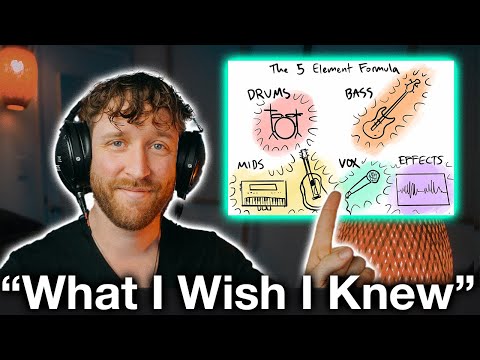
Ethan Davis builds a track in Ableton Live using only stock plugins, working through a five-part structural formula stated explicitly early in the video: drums, bass, mids, effects, and atmosphere. The session covers side-chain compression between kick and bass, key-matching a sample to a melodic part, and layering a pad for the chorus — all while explaining the role each element plays in the finished sound.
Why it ranks here: The structural formula is the real value here. Most beginner tutorials show you how to place a hi-hat; this one explains why every element serves a function and gives you a checklist that applies in any DAW. A commenter with a degree in audio engineering and six years of production experience writes that they returned to the video to revisit fundamentals — a strong signal. If you are not on Ableton, treat it as the conceptual companion to whichever software walkthrough you choose.
~26 min · introductory · Ableton Live (free trial available)
3
Best quick start
how to make a beat on FL STUDIO (Beginner)
shonci · 7:09 · Nov 2023
shonci's FL Studio tutorial runs seven minutes and covers sourcing a free drum kit from Reddit 1:39, finding a melody loop on Looperman at the project's matching BPM 2:14, building a hi-hat pattern in the piano roll 2:51, placing claps in the middle of the bar 4:01, adding an 808 with the 'cut itself' option enabled 4:53, and arranging a basic intro using FL Studio's fade-in handle.
Why it ranks here: Speed and practicality set it apart. The BPM-matching step at 2:14 — check the loop's tempo before downloading — is exactly the kind of preventable mistake that longer tutorials skip over. Viewers report making their first beat immediately after watching, and all resources used are free. It does not explain what every button does; that is intentional. If you need the full window-by-window explanation, start with Navie D and return here for a faster second run-through.
~7 min · beginner · FL Studio (free trial available)
4
Best for seeing a professional workflow
21 Savage Producer Shows You How to Make Beats
Chambers · 5:48 · Sep 2025
Chambers, a two-times gold and Billboard number-one producer, builds a complete beat in roughly six minutes: BPM selection, a melodic idea quantised with notes separated so they are not connected 0:29, kick and snare with the snare placed on the three and the seven 0:44, and a melody derived directly from the same notes as the chord 2:40. Percussion is tuned before the finished beat plays out 4:00.
Why it ranks here: The music-theory shortcut at 2:28 — use the notes from your chord to build the melody — is the most memorable single framework here for making parts feel coherent rather than random. Watching a working producer make real choices in real time is a different kind of learning from a step-by-step walkthrough. The video does promote a paid course repeatedly throughout, so the method shown is a demonstration rather than a complete lesson; pair it with Navie D or Ethan Davis for the foundational mechanics.
~6 min · intermediate · DAW unspecified in transcript
5
Best for free / browser-based production
How To Make a Beat in BandLab | For Beginners
Reid Stefan · 16:14 · Mar 2022
Reid Stefan (presented via a puppet) builds a BandLab beat using the platform's AI Song Starter to generate an initial chord progression, then adds a custom 808 bass with distortion, live-recorded claps and percussion, and hi-hats via the built-in drum machine. Chapters mark each stage: melody and sound at 4:10, drums at 11:55, arrangement and effects at 14:42, and the finished beat at 16:13.
Why it ranks here: BandLab runs in a browser on your phone or laptop with no payment or download required, removing the main barrier for a first attempt. The Song Starter AI generates a chord foundation in under two minutes, which solves the blank-screen problem that other tutorials assume you can already get past. This is the only video here that covers the full BandLab workflow from first idea through to an exported file.
~16 min · beginner · BandLab (free, browser-based)
6
Also worth watching for mobile-first production
The best way to START making beats (FOR FREE)
L.Dre · 8:48 · Mar 2022
L.Dre builds a lo-fi beat in BandLab on an iPad Mini, layering a drum loop and a keyboard loop from the app's built-in library, then recording a short piano part before switching to the desktop browser to arrange and export the finished track as a WAV file. The video explicitly demonstrates that the same project opens on phone, tablet, and laptop via one account.
Why it ranks here: The loop-first approach is genuinely useful for anyone who wants to hear something decent quickly without theory knowledge. Reid Stefan's BandLab video covers the platform in more depth and is the stronger tutorial. L.Dre's distinct contribution is the cross-device demonstration: begin a beat on your phone, finish it on a laptop later. That workflow is confirmed live in the video.
~9 min · beginner · BandLab (free, iOS/Android/browser)